 Use This Template
Contemporary
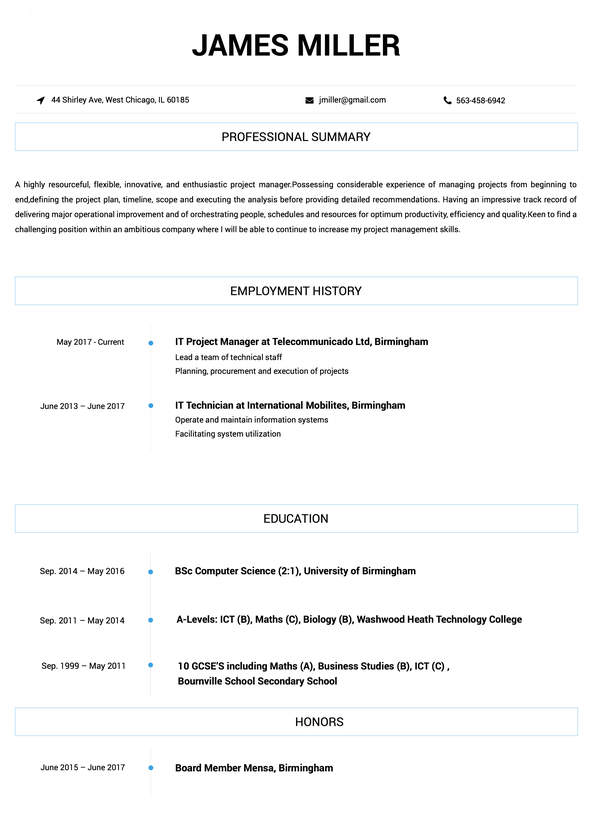
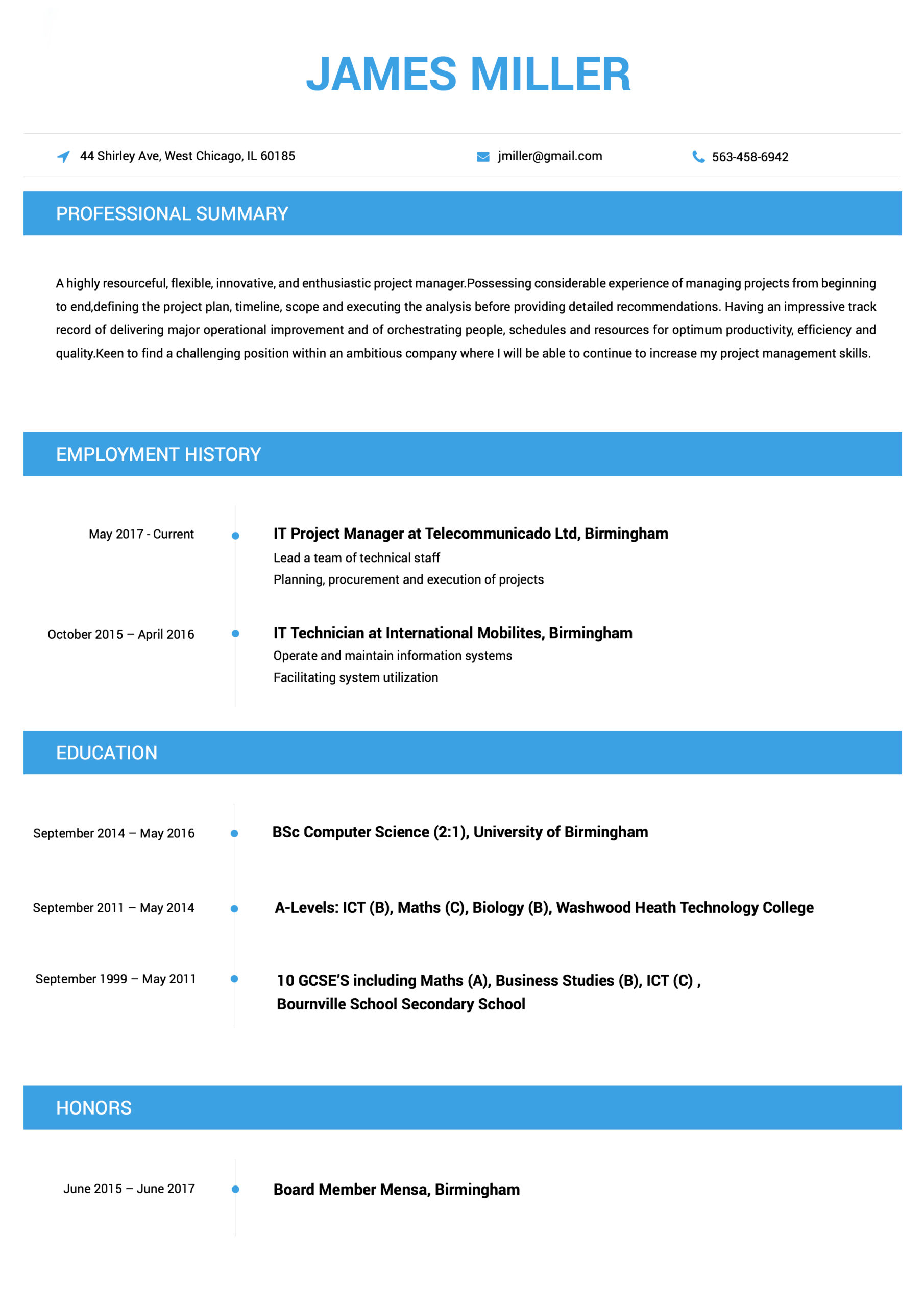
This Contemporary resume example counts with thin lines and a classic single-column format that will make the perfect first impression on any hiring manager.



You may be able to analyze a company’s financial transactions and create detailed reports about them like no other. But do you know how to craft a resume that shows off these number crunching skills? Learn how to do so with our comprehensive accounting and auditing resume guides
Without your superior organizational and communication skills, your previous workplaces would have been in shambles. Your resume is the place to make it known just how integral your administrative and clerical skills are to the smooth-functioning of your future workplace. Discover how to make a resume that conveys all of this and more here.
You’ve proven to your past employers that you have the expert know-how to bring any advertising, marketing, or PR campaign to life. But how do you convince future employers of your unique skill set? By crafting a resume they can’t put down. Our resume samples will shed a light on how to expertly go about this process.
Working in animal care isn’t just about having an affinity with animals. You need to have the right training, techniques, and experience too. Ensure your resume conveys that you possess all of the eye-catching qualities recruiters are looking for by following our expert animal care resume writing tips.
Creating visually-stunning masterpieces with a pen, paintbrush, or a computer mouse is no mean feat. It requires a powerful combination of creativity, skills, and experience. Show recruiters you have what it takes to make it in the art, creative, or design world with our handy, job-specific resume guides.
If you want to work your way up in the world of banking, you’ll need a resume that ticks all the right boxes. The thing is, knowing what to feature and how to do so is confusing unless you’re well-versed in the world of resumes. Our banking resume guides will catch you up to speed about all the ins and outs of making an ideal resume.
If only resume making was as fulfilling a process as bringing a building to life. While it may not be the most thrilling task to spend your time on, making a strong resume is crucial if you want to secure an amazing building or construction job. We’ve made it as easy as possible by clearly explaining everything you need to know in our expert guides.
Business management jobs require a certain combination of skills, training, and experiences that not everyone has. Your resume is the place to make it clear you have these qualities in droves. If you don’t know where to start, acquaint yourself with our helpful business management resume examples and tips.
Your business acumen is one quality that has always made you stand out as a professional. The thing is, if this isn’t quickly evident in your resume, a recruiter will simply look elsewhere to fill a position. The easiest way to ensure a recruiter sees you as their ideal candidate is to look to our business strategy and analysis resume guides for expert-driven advice.
Your passion for the charity and non-profit sectors has already taken you far in your career. But in order to get further, you’ll need to apply for jobs with a resume that addresses all of the criteria a recruiter is after. If you’re ready to start getting more interviews, our charity and non-profit resume guides will pave the way for you.
With a projected future employment rate of only 2% according to the Bureau of Statistics, getting a job in child care will only become more competitive. Fortunately, wowing recruiters won’t be too much of a challenge as long as your resume is in tip-top shape. Learn how to make a resume that recruiters love with our comprehensive guides.
Your strong analytical and communication abilities have made you a star consultant in the eyes of your clients. But does your resume make recruiters equally convinced of this? If your resume is looking lackluster and is in need of improvement, it’s time to make some strategic fixes to it. Keep reading to discover how to make a stunning consulting resume today.
There’s no doubt about the fact that you’re dedicated to enriching the minds of your students. But what is it that really sets you apart as an educator? Principles and HR professionals will turn to your resume to find the answer to this and any other questions they have about you as a professional. Create a resume that does your career in education justice by following our expert tips.
Ever wondered how to cement yourself as an in-demand engineer? The answer is simple: Create a resume that recruiters can’t say no to. Of course, in order to create such a resume, you’ll need to keep in mind the best practices for your particular type of engineering. To find out what they are, take a look at our range of engineering resume samples and how-to guides.
The fashion and beauty industries are notoriously hard to cement a strong reputation in. Whether you’re trying to break in or have years of experience under, you’ll need to hand in a well-written resume to snag the most glamorous jobs. If you need some inspiration to get you started, we have you covered. Our resume guides will help you to get your resume looking as pristine as the pages of Vogue.
Are you hunting for a new job in financial services? It can be tough to know what you need to do to stand out from the pack. One thing that’s for certain is that submitting an impressive resume is the key to getting hired. Instead of trying to figure out how to write a striking resume, we’ve done the hard work for you. Consult our useful financial services resume guides for more details.
You can do rounds of burpees, planks, and squats without breaking a sweat. Resume writing, however, is an entirely different story. If you’re already over feeling stressed about the prospect of working on your resume, let our fitness resume guides put your mind at ease. They’re filled with plenty of industry-specific tips and examples that will support you to piece together a resume that knocks it out of the park.
The truth of the matter is that not everyone is cut out to work in government. Recruiters certainly know this, which is why they are known for being ultra picky with who they’ll bring on board for a new job. Convincing them that you’re the professional they’ve been searching high and low for isn’t as difficult as it first seems. All you need to do is put our resume writing expert tips into action.
A career in healthcare or pharmacy can be very rewarding – even more so once you start working in the job you’ve always dreamed of. So how do you get there? Apply with a resume that puts your best foot forward. Thanks to our detailed healthcare and pharmacy resume guides, you don’t need to consult dozens of articles to learn how to write a stellar resume. Find the guide for you here.
Considering the high turnover rate in hospitality, it’s no wonder why recruiters and managers are wary of hiring just anyone. They want to track down someone who has proven themselves to be a reliable, organized employee. Make it known that you’re this person by crafting an incredible resume. Want to learn how? Whether you’ve been working in hospitality for a while or you’re looking for your first job, our resume guides will show you how.
Even human resources personnel need a helping hand when it comes to resume writing. After all, not every HR job involves recruitment. What’s more, even if yours does, looking at a candidate’s resume and crafting your own are worlds apart. Whatever HR job you’re hoping to get, there’s no getting around the fact that you’ll need to improve your resume in order to get it. Our practical resume guides will highlight all that you need to know and do.
There’s never been a better time to break into the information technology industry or take your career to new heights. After all, the Bureau of Statistics predicts that employment in this sector will increase by 12% in the coming years. This doesn’t mean you can get away with a subpar resume, however. If you want to score a top IT job, your resume will need to show recruiters you’re worth hiring. Discover how to create an eye-catching resume here.
Have you been applying for jobs in the insurance industry for weeks on end to avail? The reality is that single biggest factor that’s currently standing in between you and your dream insurance job is your resume. Fortunately, getting it in order isn’t rocket science. You just need to take a more strategic approach. We’ll show you how in our detailed resume writing guides.
Discipline, dedication, and order is the name of the game in your line of work. If a recruiter glanced at your resume, would this be evident? In order to quickly put an end to your job hunt, your resume needs to assure a recruiter that your profile aligns with what they’re after.
Get off on the right foot by familiarizing yourself with the tips and tricks we’ve shared in our law enforcement, military, and security resume guides.
The legal profession is well-known for only accepting the best of the best within its ranks. Considering that you need to compete against some of the greatest minds around, a mediocre resume simply won’t do. Your resume needs to convey complete professionalism, from its formatting to the content within it. Brush up on the essentials of writing an unforgettable legal resume here.
Want to make this the year you finally start working in your dream logistics and supply chain job? Your resume will need to showcase both your hard skills, like your ability to coordinate or manage a product’s life cycle, and your soft skills, such as your strong organizational skills. Our easy-to-follow resume guides will not only explain how to easily highlight your skills, but also your training and experiences.
The process of improving your resume is much like your day to day work. You need to maintain it so it’s always up to date, and repair it to ensure it always suits the requirements of each particular job. If you’re looking to learn the ropes of fixing your maintenance or repair resume, you won’t find a better place to begin than here with our easy-to-understand resume guides.
What does the ideal manufacturing resume look like? It should showcase your most superb skills and attributes, as well as your relevant training and experience. Ultimately, it needs to address the specific criteria a recruiter is looking for. If you’re wondering how your resume can do this, our manufacturing resume guides are here to help. Once you apply what you’ve learned, you’ll be getting more interviews than you know what to do with.
Your knack for flawlessly communicating messages to your customers, clients, or even the public is no doubt an enviable quality to have when working in media and journalism. Communicating your message to recruiters, however, is a whole different matter. If you want to tell recruiters that you’re the perfect candidate for the job, there’s no better place to start than here.
Want to score a top medical job? You’ll need to apply to each job with a strong medical resume that emphasizes your relevant skills, experiences, and abilities. If you’re unsure where to begin, our insightful step-by-step guides will be the lifeline you’ve been searching for. You’ll find everything from insider tips for impressing recruiters for medical staff, to insightful examples and resume samples.
Ready to revolutionize your resume but don’t see the resume guide you’re looking for? There’s a good chance you’ll find it here. This page features a variety of resume guides that don’t fall within the categories featured on this page.
Does your resume convey your expertise in managing, leasing, buying, or selling real estate? If the answer is “No,” there’s no need to fret. Our real estate resume samples and guides are designed to provide you with useful information as well as expert tips to create a monumental resume that recruiters won’t be able to resist.
After spending day in and day out researching, the last thing you’ll want to do is spend endless hours creating your resume. Fortunately for you, we’ve done the hard yards by putting together the most up-to-date resume guides out there for those in the research industry. Check them out today if you’re serious about beginning your ideal job this year.
Are you known for your exceptional customer service skills? Or perhaps your ability to hit daily sales targets is unparalleled? Your resume needs to prominently feature skills like these in addition to your achievements, experiences, and training. If you’re after in-depth expert insights and clear explanations regarding the resume making process, look no further than our retail resume guides.
You could sell just about anything with your eyes closed. But do you know how to create a resume that sells what a consummate professional you are? If you’re feeling stumped, you’re in good hands. We’ve figured out all of the intricacies of creating a stunning sales resume and have detailed them in our easy-to-read resume guides. Take a look for yourself here.
The formula for the perfect science and biotech resume doesn’t require endless experimentation. We’ve already worked out all the key ingredients that you’ll need to include in our expert science and biotech resume guides. Discover how to create an explosive resume with our expert guides.
You have a firm grasp of one or more programming languages thanks to your years of training and experience. However, if you’re like most software developers, there’s a good chance you haven’t conveyed this well in your resume. Not to worry, you’ll soon be able to speak the language of resumes too after taking careful look at our software development resume guides and samples.
Therapists know the right questions to ask your patients to help them on the path to a healthier life. But knowing which questions about yourself your resume should answer is a different kettle of fish. If your resume is inspiring more questions than answers from a recruiter, it’s high time that you worked on your resume. Discover all of the key components every therapy resume should have here.
Are you tired of seeing job after job pass you by? Job hunting can be grueling if you’re in the transportation industry. The best thing you can do to set yourself up for success is to refine your resume. If you’re ready to stop getting rejected and start getting hired, make sure to arm yourself with the professional tips and advice we’ve featured in our transportation resume guides.

Its never been simpler to build an impressive resume.
Use This Template
This Contemporary resume example counts with thin lines and a classic single-column format that will make the perfect first impression on any hiring manager.
 Use This Template
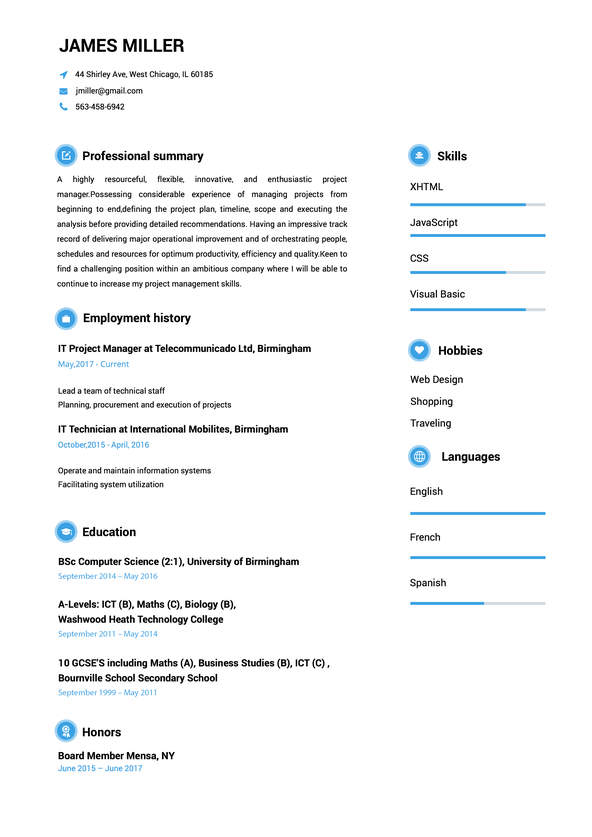
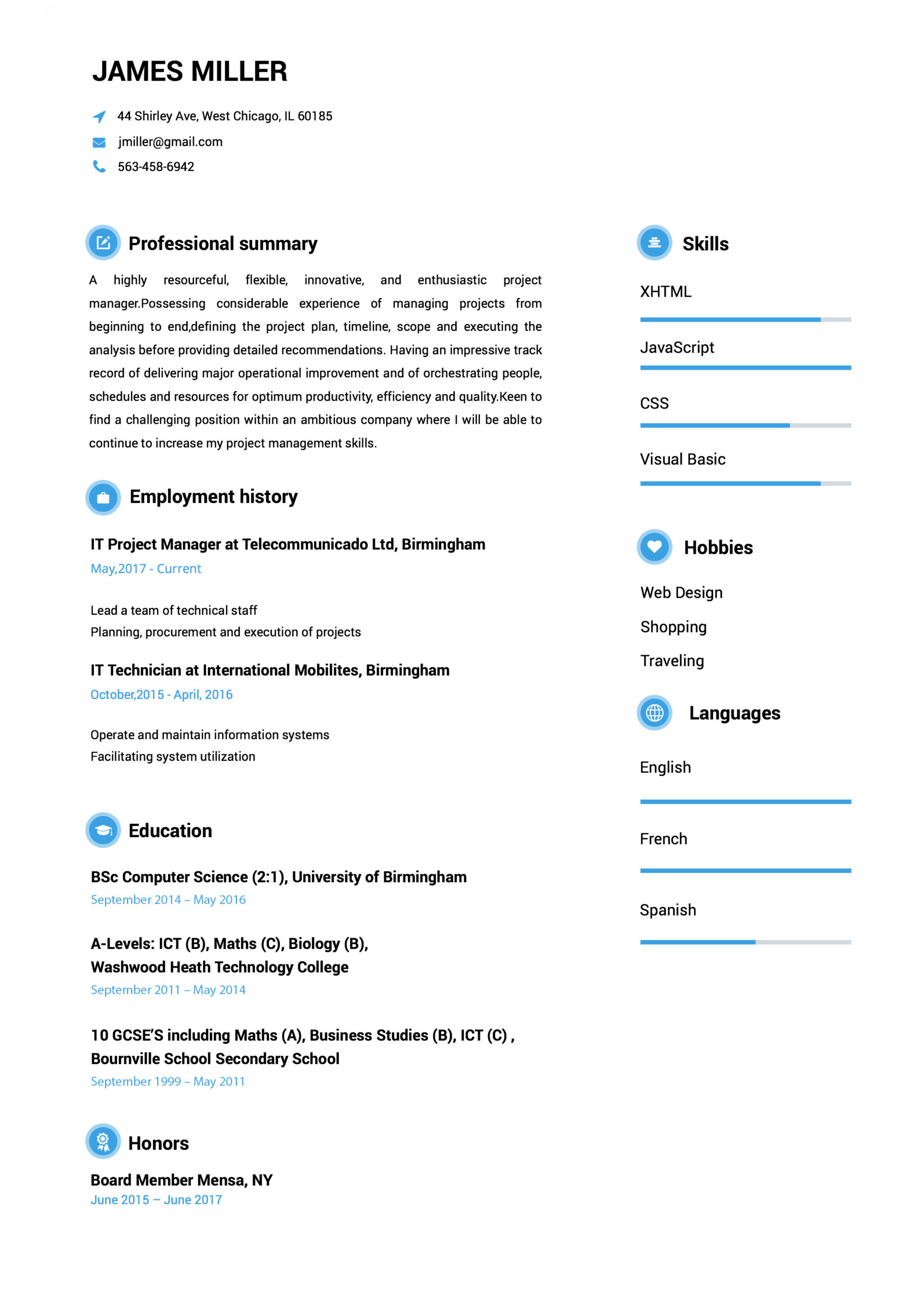
This interesting Cool resume example uses a twin-column format and charming icons to differentiate sections.
 Use This Template
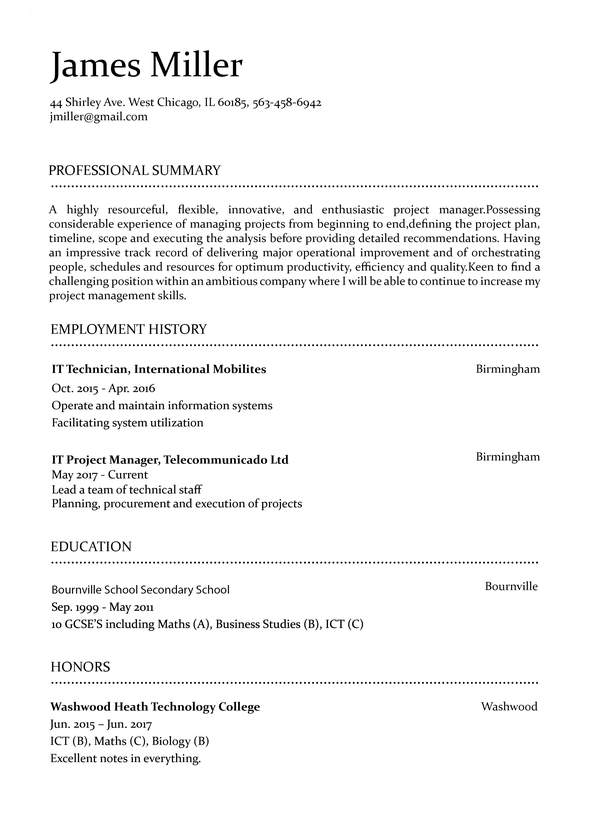
This Modern resume example displays define sections with a traditional black-and-white color pattern.
Easy to follow prompts and beautiful templates to choose from!! Started getting calls for job interviews a few days after submitting and applying the resume that I created with the help of this amazing website. It definitely stands out!
Found this website really very helpful since I wanted to make my resume look super professional and eye-catching too…Finally, I was able to set up a perfect resume!!!
Download took 2-3 seconds…..I made my CV while waiting in the queue to attend my interview! I loved the professional resume templates. Thanks for this useful website.
Went for a job interview and the potential employers were very impressed with my CV. I must say that Resumebuild comes with so many interesting templates and also, creating a resume with it is super easy.

Susana Lee
Software Engineer
(545) 432-0087
[email protected]
Linkedin.com/in/susanalee18
123 Any Street, Denver, CO 00000
An IT expert professional, passionate about software development. Experienced in working with teams in different software development stages, ensuring a high-quality and fulfillment of company’s needs.
03/2017 - 07/2020
- Built an e-commerce site integrated with multiple payment APIs for a 32% in company revenue
- Developed new infrastructure to easily handle over a million client files
- Consistently achieved 100% compliance with industry best practices
- Reduced security breaches by 84%
- Programming languages
-Java, JavaScript, C++, Python3
-Relevant Institute Courses
-Machine Learning, Operation Research,
-Computer Programming, Graph Theory and Networks
Denver Institute of Technology & Science,
Denver, CO
07/2016 – 08/2020
Bachelor of Engineering in Chemical Engineering
TensorFlow in Practice Specialization: Coursera
Improving Deep Neural Networks: Hyper-parameter tuning : Coursera
Structuring Machine Learning Projects : Coursera
Network Management : Nettech Pvt Ltd
Google Cloud Platform Fundamentals: Core Infrastructure: Google Cloud
Alteryx Designer Core Certification
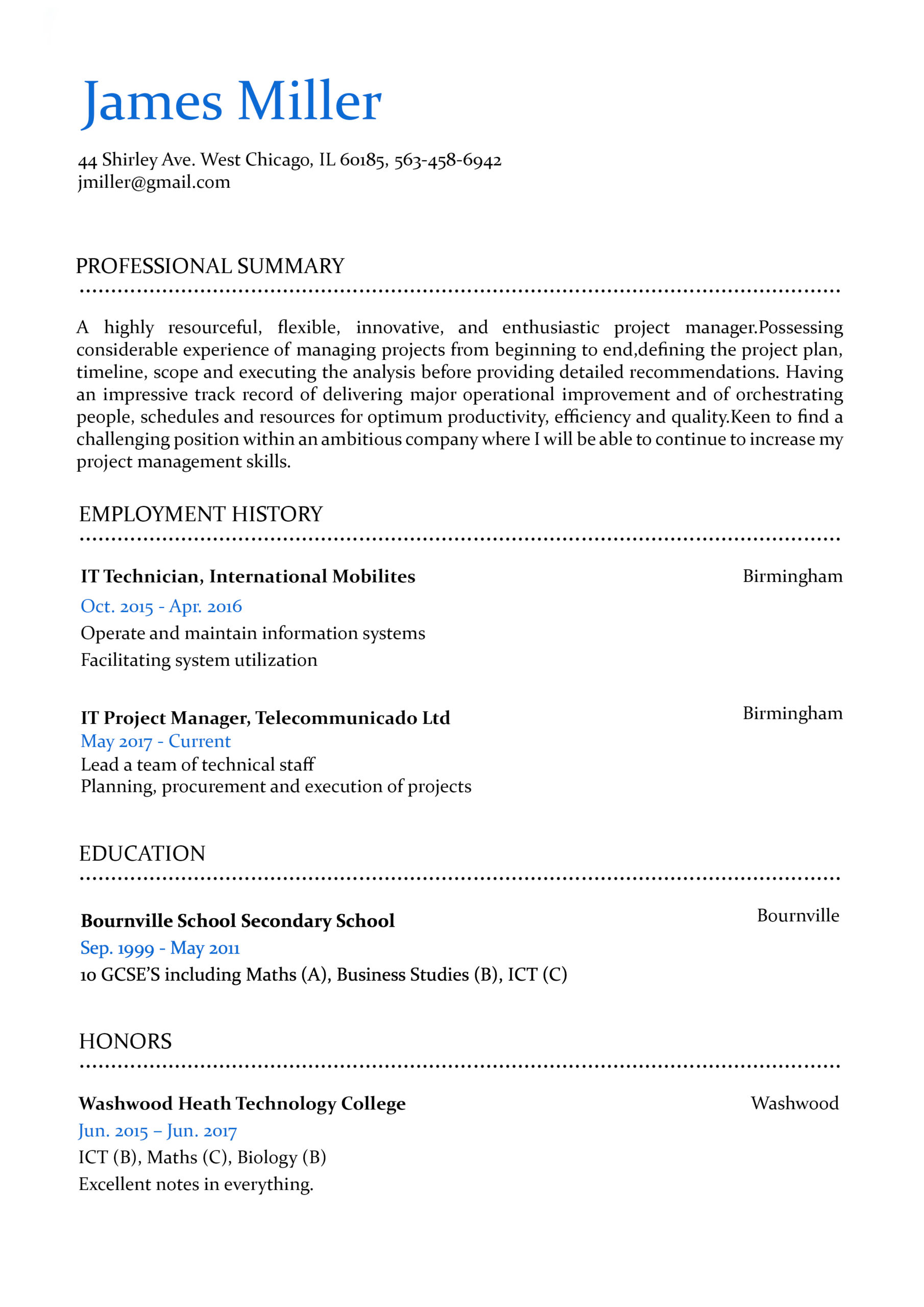
Formats that work.
 Use This Template
 Use This Template
 Use This Template
 Have Questions About Writing A Perfect Resume?
Expert Answers to All Your Resume Questions.
Resume Templates FAQ
When you’re applying for jobs, you’re probably in one of two camps. You might be working and applying at the same time, which means you’re very short on time. Or, you’re applying without a job in which case you probably need to get hired ASAP.
In either case, you need to simplify the process of creating a great resume any way you can. Starting off by carefully reviewing proven resume examples from your specific industry is one of the most effective ways to do that.
It’s like trying to build a car without being allowed to look at one. Sure, you’ve seen cars before, but being able to compare what you’re doing to the best designs out there is going to give you far better results. Plus, when you can see how your resume compares to top-quality resume examples, you can go into the job searching process with more confidence.
Creating an effective resume is about getting all the details right. But even for seasoned resume experts, it’s easy to forget something. After all, you might think resumes haven’t changed much, but the onset of powerful and user-friendly resume builders means the resumes you’re competing against probably look very different than they would have just a few years ago.
But using resume examples is also about perspective. One of the fundamental mistakes most job applicants make is not thinking about the audience for their resume. This isn’t your prospective employer, it’s the hiring manager who works for them. You need to always be thinking about that hiring manager.
Using resume examples, however, makes it easy. By imagining you’re a hiring manager and analyzing examples, you can get a feel for what makes a resume more effective in your industry. Then, you can implement those lessons on your own resume.
Using resume examples, however, makes it easy. By imagining you’re a hiring manager and analyzing examples, you can get a feel for what makes a resume more effective in your industry. Then, you can implement those lessons on your own resume."
"The first step of this process is finding good examples. A simple Google search will show that the internet is full of resume examples for every conceivable job. However, not all of them are created equal. You want to avoid poor-quality examples thrown together without care or auto-generated by an algorithm.
So how do you tell which examples are worth your time?
What makes a good resume example?
There are a few telltale signs of a quality resume example. The first place to look is the site where you found it. If it’s specifically focused on your industry and includes resume examples and tips for getting hired, you’re likely to find good examples by people familiar with what hiring managers will look for within your position.
If you’re evaluating a site with resume examples for multiple industries, look for hints that they’ve been created by people who understand your industry. Do their examples misuse jargon? Do the skills, accomplishments, and experience in the resume make sense? Are there unique elements that make them stand out?
As you review more resume examples, you’ll also start to develop your own sense of what makes them effective. All that said, it’s actually still worth seeing a few bad examples to understand what your resume should avoid.
How to gather relevant information from examples?
Start with your first impression. One of the most important missions your resume will have is creating a strong first impression in the mind of a hiring manager. So which element of the resume example stands out? What is the first thing you read? After you’ve read that first section, what do you think about the candidate?
Then, as you read the resume, what questions do you have? For example, if you mention you have experience coding in a specific programming language but don’t give any more details, the reader might wonder “what kind of experience? What did you create with that language?” If that question is answered at the end of your resume, the entire time they’re reading your resume they will have that nagging question in their mind.
These are the kinds of questions you want to anticipate and get ahead of. If the reader finds that everything in your resume is clear and the questions they have are quickly and efficiently answered, you’ll look fantastic as a candidate.
As you review more resume examples and read through skills and work experience within those, you’ll get a better feel for how a resume can handle these questions.
How to apply that information to your own resume?
As mentioned, while you’re reviewing resume examples you’ll want to take notes about what you like, don’t like, and what stands out. This can serve as the starting point when you’re writing your own resume.
However, you shouldn’t stop there. It’s best to pause a few times while working on your resume and look back at that list. Are you falling into some of the traps you found in other resume examples? This is when you should try and look at your resume from the perspective of a hiring manager.
Of course, that’s not always easy to do, so consider getting a trusted friend or colleague to help you out. They can review some relevant resume examples as well before helping you evaluate yours. You can also provide them with your list of “dos and don’ts” and ask them whether you nailed them all on your resume."
"As we mentioned above, personalizing is perhaps the single best way to boost your chances of getting hired with your resume. But it’s also easier said than done. How you personalize your resume makes a big difference. But first, why should you bother taking the extra time?
When a resume is tailored for a specific position, this tells the hiring manager and employer several key things. The first is simply that you took the time to do the job right. Instead of cutting corners by sending out identical resumes, you put in the extra effort. This communicates a tremendous amount about you as a person and a candidate. Next, it simply tells them you have the skills and experience they need, which is the main goal of your resume anyways.
Ultimately, a resume is all about communicating information. Mostly that’s done by listing facts, but we all know that actions speak louder than words. By personalizing your resume, you’re communicating what kind of candidate you are through your actions. Considering how few applicants overall do this, you’ll stand out and be far more memorable to that hiring manager who’s reviewed 70 resumes this week.
How to personalize it for every job and why that’s important?
The single easiest way to personalize your resume for a job is to start by researching the employer and the position. Ultimately, you’re being hired to solve some set of problems. If you can identify the skills and experience the role calls for to solve those problems, you’ll be able to show why you’re a great candidate for the job.
The first way to do this is to carefully read the job description. Read between the lines and ask yourself “what would the perfect candidate for this position look like?” Also list all of the specific skills, accomplishments, and qualifications mentioned in the job description that are relevant to your own experience and background.
At this point, you can try to take your resume personalization to the next level by researching the employer themselves. Look into what challenges they’re facing and how you can help address them. If your resume can frame you as someone who can help solve a major problem at a prospective employer, you’ll stand out."
"There are a number of key pieces of information that you need to include in your resume. The following six resume sections cover the most pertinent information hiring managers are looking for:
Contact information: Your name, address, phone number, and email address.
A Resume Summary or Resume Objective: A section that succinctly conveys why you’re a standout candidate for the given position.
Employment history: An overview of your most relevant professional experiences, with an emphasis on your key achievements.
Education: Provide details about your degree or diploma.
Training and certifications: Note any training courses and certifications that are relevant to the job here.
Skills: List both hard (technical) skills and soft (interpersonal) skills you offer.
But before you get writing, keep in mind that you will need to tailor your resume to the given role you are applying for.
A simple rule of thumb is to stop thinking, “I can build my resume in a way that lets me apply to any position I want,” and start thinking, “I need to build my resume in a way that highlights how suitable I am for the specific position I’m after.”
This simple switch in thinking will help you to address the precise qualities a hiring manager is after. Remember, hiring managers look to your resume to see if you’re an ideal fit for the specific role they’re hiring for. So if your resume is too generic, they’ll simply think, “Next!”
That’s why it’s vital to analyze the advertisement of the role you want for keywords that indicate what the hiring manager is after. Once you identify these keywords, you should integrate any that are relevant to you throughout each of the sections we mentioned above."
"Putting hours of work into a personalized resume without thinking about an Applicant Tracking System (ATS) is a recipe for disaster. These tools are used by 98% of Fortune 500 companies and are increasingly common even in smaller companies. The point is unless you’re 100% certain that the employer you’re applying to doesn’t use an ATS, you need to assume that they do.
What is ATS?
At the most basic level, an ATS is a program that uses artificial intelligence (specifically natural language processing) to analyze large numbers of resumes far faster than a human could. They are given a set of criteria to look for and if a resume meets enough of them, it’s forwarded along to a hiring manager for manual review.
For companies, this is a massive time saver. They can do more with fewer hiring managers and hire candidates faster. The problem is that these benefits can act as roadblocks to a jobseeker if applicants don’t understand how to best create a resume to get past an ATS.
Why is it important to get past an ATS?
Seventy-five percent of resumes don’t make it past an ATS. This single fact tells you that if you can be in the 25% that do get through to a hiring manager, you’ve vastly increased your chances of getting hired. If an ATS worked perfectly and only resumes meeting the qualifications made it through, this wouldn’t matter, but that’s far from the truth.
This shocking reality is why so many resumes get rejected. Often it’s not because the candidates simply didn’t meet the employer’s criteria, but rather because of an error.
These errors come in a few forms. The first is that the file submitted isn’t a type the ATS can read. But more often, the issue lies with how the data is structured within the file. Charts, columns, images, and all kinds of non-standard formatting can confuse an ATS and lead to them having a hard time understanding the content of your resume. In most cases, this leads to automatic rejection.
What does an ATS look for?
This is the key question you need to be asking yourself. Fortunately, you’ve got a pretty good guide at your fingertips - the job description. We mentioned above that you should carefully study the job description and list all of the skills, accomplishments, work experience, etc. that it asks for in a candidate that also aligns with your own profile.
Armed with that list, your mission is to try and ensure as many of those elements are on your resume as possible (without lying of course). One tip is to make sure you try and use the same wording as the job description. After all, an ATS might not realize that what you’ve written means the same thing as what it’s looking for. By using exact wording, you’re making it as likely as possible the ATS will recognize you have the qualities it’s looking for.
How to get your resume past ATS?
Ensuring your resume gets past an ATS comes down to combining all of the tips we’ve given in this section into a single plan. Let’s break it down into 3 easy steps.Use the right file format. In almost all cases, ATS tools are designed to read .pdf, .doc, and .docx files. So be sure to use one of these and avoid things like image files.Use a resume builder that has been designed for an ATS. As mentioned, even if you do submit the right file type, it’s possible that the way the data is structured within the file can lead to problems. The best way to avoid this problem is to use a purpose-built resume builder that produces ATS-optimized files.Use a smart keyword strategy. If you identify the skills, work experience, etc. the ATS is looking for and ensure your resume has those elements and uses the same wording as the job description, you’ll be way ahead of the competition."
"If the mission of your resume is to convey information, the order you structure that information matters a lot. Whether you’re talking about a movie or a first date, giving information in the wrong order can create a lot of confusion and bad first impressions. So, you’ll want to choose the right format for your needs. Here’s a breakdown to help you choose:
Chronological
This format is the most common and it matches what most hiring managers are looking for. In this case, you prioritize your work experience, beginning with your most recent experience and ending with your oldest experience. Unless you have a specific reason to use another format (for example, you have no work experience), this should be your default choice.
Functional
A functional resume format focuses on emphasizing skills and abilities over presenting your work history in order. Often, this will be used by job applicants who are looking to draw attention away from their work history and focus it on their skills, either because they don’t have much work experience or are changing careers and would rather emphasize their transferable skills. However, many recruiters find functional resumes frustrating, meaning they aren’t an ideal choice in most cases.
Combination (AKA Hybrid)
In some cases, you may want to combine formats. For example, you may list your work history in reverse-chronological order while also breaking down your skills with a functional section. This allows you to give the hiring manager options for how they want to review your work experience and skills, but it does also take more space.
Generally, combination resumes are the better choice if you have years of experience and want a structured way to equally emphasize both your skills and your history in different positions.
How long should a resume be?
The internet is full of advice on resume length. Some experts will say it should always be one page, while others will insist that you should create one page for every 10 years of experience you have.
It’s important to remember that the people reviewing your resume are pressed for time, so you want to communicate the most relevant information as concisely as possible. That said, a hiring manager would generally prefer a 2-page resume of relevant information rather than a shorter page full of irrelevant information."
"In addition to the examples on this page, there are a few other tools that make creating a resume easier and more efficient. One is a trusted friend or colleague to give you honest feedback. It can be extremely difficult to get outside of your own head and evaluate the resumes you create without bias. That’s why getting an outside perspective is so valuable. A list of useful action verbs can also help you ensure you sound like an active and dynamic candidate.
The next tool you need is a resume builder. With ATS tools so common, you simply can’t afford to take the chance that your resume will get rejected because of some technical issue. Using the right resume builder lets you have confidence you’ll be ready for an ATS.
In addition, a great resume builder should give you access to clean and modern design. In a sea of dull Word docs, a resume that uses design to enhance the content will always stand out. Lastly, you need a resume builder to avoid all the formatting headaches which come with trying to get the columns and alignments just right when creating a resume manually. A great builder makes the whole process of creating multiple personalized resumes for different employers easy, saving you time and hassle.
If you can use that saved time to further improve your resume content, you’ll be even more likely to get the job you want."